It happens to all of us. You come in to work, fire up the computer and call up your e-mail. Then you sit, index finger at the ready, hitting the delete key as a mass of refinance offers, weight loss schemes and pornographic site come-ons scroll by.
It鈥檚 popularly called spam, and we all hate it. But most of us have resigned ourselves to putting up with it. Oh, we鈥檝e made efforts. For some time, Computing & Communications has provided an e-mail filtering tool, allowing us to block anything coming from a certain source or containing specific words in the subject line. But try as we might, the spammers get to us. There are, for example, many ways to title a weight loss offer鈥檚 e-mail. So even though I鈥檝e blocked anything with 鈥渨eight鈥� in the subject line, I still get those offers.
What鈥檚 a poor, harassed office rat to do? Now, C&C has an answer. They鈥檝e installed a new service on the University鈥檚 mail handling software that can identify spam and kick it right out of your inbox. All you have to do is turn it on.
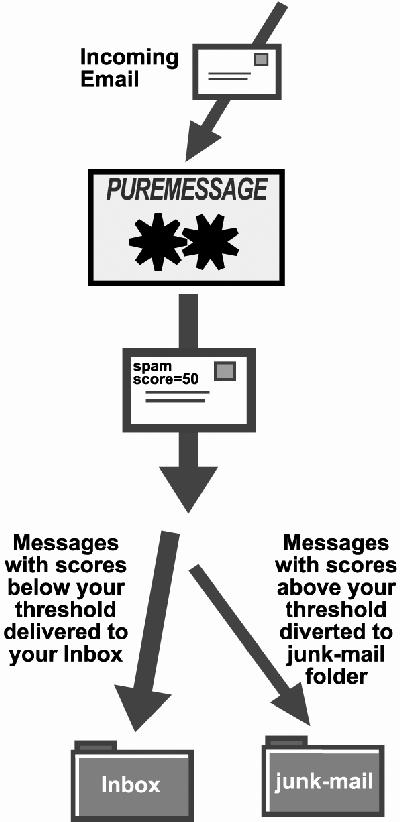
The key to this new service is a program called PureMessage, and it works like this. As a message comes into the central server, it鈥檚 scanned both for viruses and for how much it looks like spam. Each message gets a score somewhere between 1 and 100.
鈥淭he program is using about 1,000 different tests on each individual message,鈥� says C&C鈥檚 Rick Ells. 鈥淭hese are looking for particular strings of text and the way the text is presented, such as all caps and things about the subject field.鈥�
The program also checks the so-called header information 鈥� hidden technical data that tells, among other things, where the message is supposed to have come from. It鈥檚 common, Ells says, for spammers to manipulate the header to hide the source of the message.
Once the message has been given a score that indicates how likely it is to be spam, it passes on to your e-mail server. If you have the spam filter turned on, spam will be routed to a folder called 鈥渏unk mail鈥� rather than to your inbox.
How high does the spam score have to be to send a message to the junk pile? That depends on you. When you turn on the spam filter, you鈥檒l be asked whether you want to set it at low risk, medium risk or high risk. If you choose low risk, only those messages almost certain to be spam will be filtered out. Medium risk will filter out more of them and high risk the most.
鈥淣o spam filter is perfect,鈥� Ells notes. 鈥淥ccasionally you鈥檒l find that a good message will get a high spam score, but you will have a chance to retrieve it.鈥�
That鈥檚 because you can open your junk mail folder and scan what鈥檚 in it. All messages that are sent to the junk mail folder are kept there for seven days, at which point they鈥檙e automatically erased. Obviously, those who set their risk level as high are most likely to find good messages among the junk and so should be the most vigilant in reviewing this folder.
The spam filter is available for all faculty, staff and students and My 91探花net customers in the E-mail Delivery Manager (EDM) in My 91探花(). Instructions and a link to EDM are at . However, there are some caveats. The filter only works on e-mail handled by the UW鈥檚 central e-mail services. So, only e-mail addressed to @u.washngton.edu, @washington.edu, @cac.washington.edu, @myuw.net, or @alumni.washington.edu can be filtered. Some departments and centers run their own e-mail systems independent of the central e-mail services, and messages going directly to such systems can鈥檛 be run through this filter.
Users should also exercise care when putting a vacation message on their e-mail. Responding to spam often generates more spam, so a vacation response can have an unwanted effect. When the spam filter is running at the same time as the vacation message, the filtering will happen first, so no vacation message will be sent to the spammer. But, if good messages get weeded out along with the spam, they will be put in the junk folder and may be deleted before the user returns to review the junk folder.
The user therefore faces a dilemma of whether to leave the spam filter running when on vacation and at what risk setting. The filter鈥檚 documentation provides information about the effects of all choices.
The filter is the result of several months of work by a C&C team led by Ells. The team looked at a variety of spam filters from both open and commercial sources and settled on PureMessage, which has been used with success at other major universities.
鈥淥nce we got it working we invited some of our colleagues at C&C to use it and give us feedback,鈥� Ells said. 鈥淭hen we invited about 20 faculty, staff and students who had complained about spam in the past to try it out, and they gave us feedback too.鈥�
The current product is a sort of basic model, according to Ells. More advanced features are possible, but C&C wanted to put the basic filter out there and find out what people might want in the way of other features before adding anything.
鈥淲e are feeling our way along here,鈥� Ells says. 鈥淲e really want to hear from people about how this system works for them.鈥�
In fact, C&C is interested in any feedback about the filter. Ells says he鈥檚 eliminated about 70 messages a week from his inbox using the filter, but he and other team members recognize that people use e-mail in a variety of ways and they want to know how well it works for others.
The spam filter is easy to turn on. The instructions on the URL above should be all you need to know to get it going. Ells says some users of Outlook Express may not see their junk mail folder, but the folder is there and instructions on how to 鈥渦nhide鈥� it are included in the documentation.
Of course, if you want to lose 40 pounds in 40 days, plan to earn $100,000 a week in a multi-level marketing scheme, or think it鈥檚 a good idea to give money to a deposed ruler in central Africa, you may want to keep your spam, but C&C is betting that鈥檚 unlikely. Feedback on the new filtering system can be sent to help@cac.washington.edu.